Week2 Quiz
Q1.
- reference:
http://spartacodingclub.shop/sparta_api/seoulbike
desired outcome
; http://spartacodingclub.shop/ajaxquiz/02_1
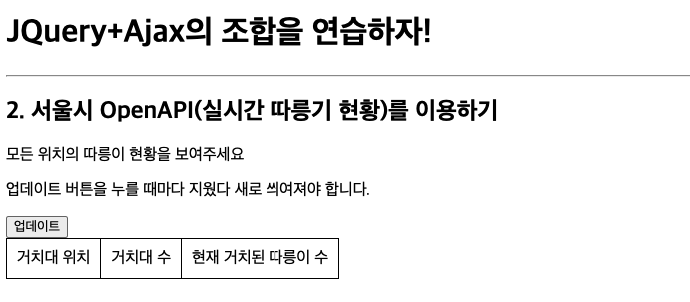
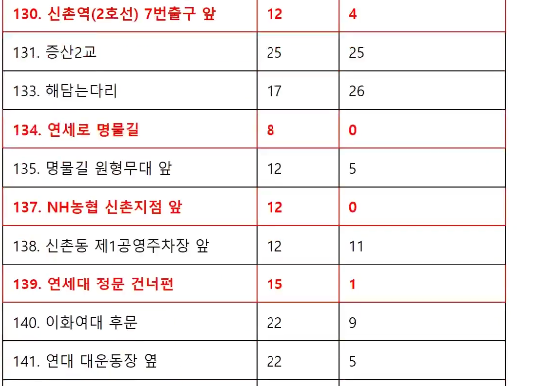
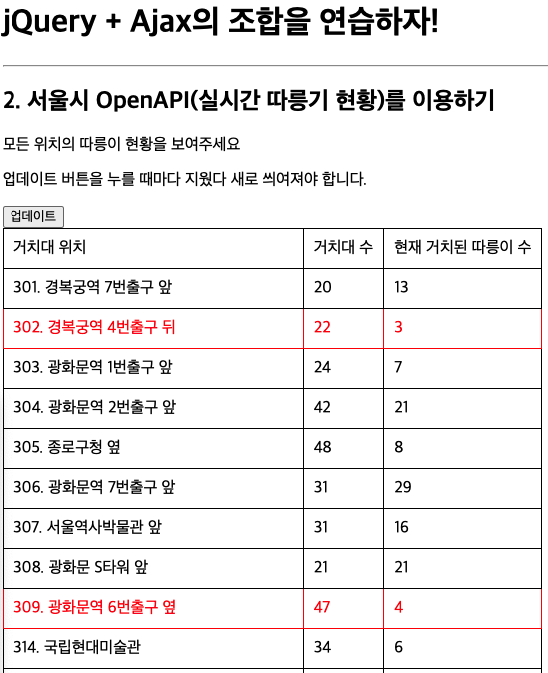
When the button is clicked, it shows the current status of the bikes and changes the color of the location where there are fewer than 5 bikes red.
- To begin, create a file called
ajax02.htmland copy and paste the code below.
<!doctype html>
<html lang="ko">

<head>
    <meta charset="UTF-8">
    <title>JQuery 연습하고 가기!</title>
    <!-- JQuery를 import 합니다 -->
    <script src="https://ajax.googleapis.com/ajax/libs/jquery/3.4.1/jquery.min.js"></script>

    <style type="text/css">
        div.question-box {
            margin: 10px 0 20px 0;
        }

        table {
            border: 1px solid;
            border-collapse: collapse;
        }

        td,
        th {
            padding: 10px;
            border: 1px solid;
        }
    </style>

    <script>
        function q1() {
            // 여기에 코드를 입력하세요
        }
    </script>

</head>

<body>
    <h1>jQuery + Ajax의 조합을 연습하자!</h1>

    <hr />

    <div class="question-box">
        <h2>2. 서울시 OpenAPI(실시간 따릉기 현황)를 이용하기</h2>
        <p>모든 위치의 따릉이 현황을 보여주세요</p>
        <p>업데이트 버튼을 누를 때마다 지웠다 새로 씌여져야 합니다.</p>
        <button onclick="q1()">업데이트</button>
        <table>
            <thead>
                <tr>
                    <td>거치대 위치</td>
                    <td>거치대 수</td>
                    <td>현재 거치된 따릉이 수</td>
                </tr>
            </thead>
            <tbody id="names-q1">
                <tr>
                    <td>102. 망원역 1번출구 앞</td>
                    <td>22</td>
                    <td>0</td>
                </tr>
                <tr>
                    <td>103. 망원역 2번출구 앞</td>
                    <td>16</td>
                    <td>0</td>
                </tr>
                <tr>
                    <td>104. 합정역 1번출구 앞</td>
                    <td>16</td>
                    <td>0</td>
                </tr>
            </tbody>
        </table>
    </div>
</body>

</html>
- copy and paste Ajax code below under
function q1
$.ajax({
  type: "GET", // GET 방식으로 요청한다.
  url: "여기에URL을입력",
  data: {}, // 요청하면서 함께 줄 데이터 (GET 요청시엔 비워두세요)
  success: function(response){ // 서버에서 준 결과를 response라는 변수에 담음
    console.log(response) // 서버에서 준 결과를 이용해서 나머지 코드를 작성
  }
})
    <script>
        function q1() {
            $.ajax({
              type: "GET", // GET 방식으로 요청한다.
              url: "여기에URL을입력",
              data: {}, // 요청하면서 함께 줄 데이터 (GET 요청시엔 비워두세요)
              success: function (response) { // 서버에서 준 결과를 response라는 변수에 담음
                console.log(response) // 서버에서 준 결과를 이용해서 나머지 코드를 작성
              }
            })

        }
    </script>
- update the URL in
<script>
    <script>
        function q1() {
            $.ajax({
              type: "GET", // GET 방식으로 요청한다.
              url: "http://spartacodingclub.shop/sparta_api/seoulbike",
              data: {}, // 요청하면서 함께 줄 데이터 (GET 요청시엔 비워두세요)
              success: function (response) { // 서버에서 준 결과를 response라는 변수에 담음
                console.log(response) // 서버에서 준 결과를 이용해서 나머지 코드를 작성
              }
            })

        }
    </script>
- Do the test.

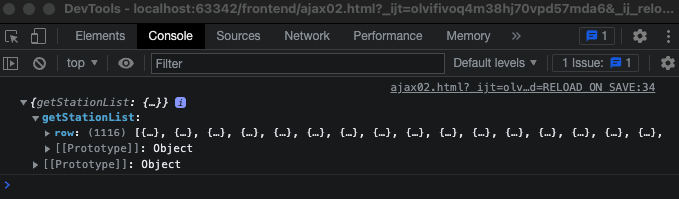
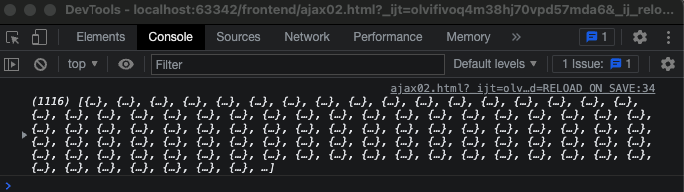
We need a row data.
    <script>
        function q1() {
            $.ajax({
              type: "GET", // GET 방식으로 요청한다.
              url: "http://spartacodingclub.shop/sparta_api/seoulbike",
              data: {}, // 요청하면서 함께 줄 데이터 (GET 요청시엔 비워두세요)
              success: function (response) { // 서버에서 준 결과를 response라는 변수에 담음
                console.log(response['getStationList']['row']) // 서버에서 준 결과를 이용해서 나머지 코드를 작성
              }
            })

        }
    </script>
- add
for statement
    <script>
        function q1() {
            $.ajax({
              type: "GET", // GET 방식으로 요청한다.
              url: "http://spartacodingclub.shop/sparta_api/seoulbike",
              data: {}, // 요청하면서 함께 줄 데이터 (GET 요청시엔 비워두세요)
              success: function (response) { // 서버에서 준 결과를 response라는 변수에 담음
                let rows = response['getStationList']['row']
                  for (let i = 0; i < rows.length; i++) {
                      let name = rows[i]['stationName']
                      let rack = rows[i]['rackTotCnt']
                      let bike = rows[i]['parkingBikeTotCnt']
                  }
              }
            })

        }
    </script>
- Let's see the result in Console.
console.log(name, rack, bike)
    <script>
        function q1() {
            $.ajax({
              type: "GET", // GET 방식으로 요청한다.
              url: "http://spartacodingclub.shop/sparta_api/seoulbike",
              data: {}, // 요청하면서 함께 줄 데이터 (GET 요청시엔 비워두세요)
              success: function (response) { // 서버에서 준 결과를 response라는 변수에 담음
                let rows = response['getStationList']['row']
                  for (let i = 0; i < rows.length; i++) {
                      let name = rows[i]['stationName']
                      let rack = rows[i]['rackTotCnt']
                      let bike = rows[i]['parkingBikeTotCnt']

                      console.log(name, rack, bike)
                  }
              }
            })

        }
    </script>
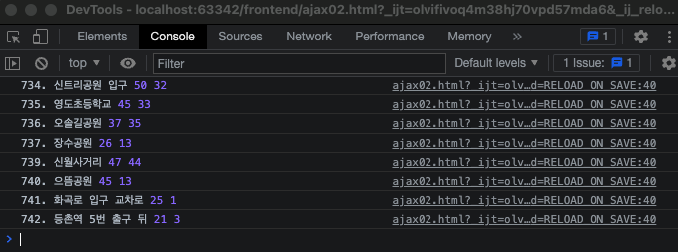
- If it works well, we need to see this in the page instead of Console. For this, we need to change,
console.log(name, rack, bike)
to
let temp_html = ``
in those back ticks, we need to add
<tr>to the list callednames-q1
    <script>
        function q1() {
            $.ajax({
              type: "GET", // GET 방식으로 요청한다.
              url: "http://spartacodingclub.shop/sparta_api/seoulbike",
              data: {}, // 요청하면서 함께 줄 데이터 (GET 요청시엔 비워두세요)
              success: function (response) { // 서버에서 준 결과를 response라는 변수에 담음
                let rows = response['getStationList']['row']
                  for (let i = 0; i < rows.length; i++) {
                      let name = rows[i]['stationName']
                      let rack = rows[i]['rackTotCnt']
                      let bike = rows[i]['parkingBikeTotCnt']

                      let temp_html = ` <tr>
                                            <td>${name}</td>
                                            <td>${rack}</td>
                                            <td>${bike}</td>
                                        </tr>`
                      $('#names-q1').append(temp_html)
                  }
              }
            })
        }
    </script>
- To make it stop adding to the existing list, add the code below
$('#names-q1').empty()
    <script>
        function q1() {
            $('#names-q1').empty()
            $.ajax({
              type: "GET", // GET 방식으로 요청한다.
              url: "http://spartacodingclub.shop/sparta_api/seoulbike",
              data: {}, // 요청하면서 함께 줄 데이터 (GET 요청시엔 비워두세요)
              success: function (response) { // 서버에서 준 결과를 response라는 변수에 담음
                let rows = response['getStationList']['row']
                  for (let i = 0; i < rows.length; i++) {
                      let name = rows[i]['stationName']
                      let rack = rows[i]['rackTotCnt']
                      let bike = rows[i]['parkingBikeTotCnt']

                      let temp_html = ` <tr>
                                            <td>${name}</td>
                                            <td>${rack}</td>
                                            <td>${bike}</td>
                                        </tr>`
                      $('#names-q1').append(temp_html)
                  }
              }
            })
        }
    </script>
Let's make it show the number of bikes fewer than 5 in red.
- add
class="urgent"
    <script>
        function q1() {
            $('#names-q1').empty()
            $.ajax({
              type: "GET", // GET 방식으로 요청한다.
              url: "http://spartacodingclub.shop/sparta_api/seoulbike",
              data: {}, // 요청하면서 함께 줄 데이터 (GET 요청시엔 비워두세요)
              success: function (response) { // 서버에서 준 결과를 response라는 변수에 담음
                let rows = response['getStationList']['row']
                  for (let i = 0; i < rows.length; i++) {
                      let name = rows[i]['stationName']
                      let rack = rows[i]['rackTotCnt']
                      let bike = rows[i]['parkingBikeTotCnt']

                      let temp_html = `<tr class="urgent">
                                            <td>${name}</td>
                                            <td>${rack}</td>
                                            <td>${bike}</td>
                                        </tr>`
                      $('#names-q1').append(temp_html)
                  }
              }
            })
        }
    </script>
Now it shows all the data in red.
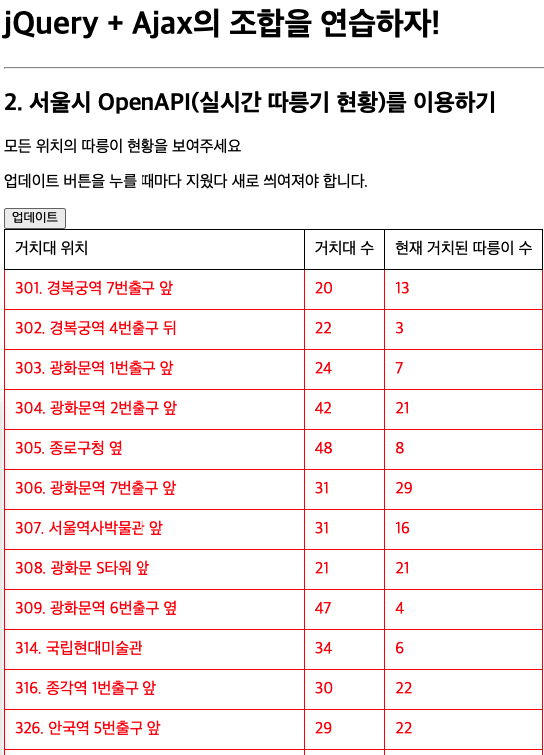
- to solve it, add
let temp_html =andifstatement.
    <script>
        function q1() {
            $('#names-q1').empty()
            $.ajax({
              type: "GET", // GET 방식으로 요청한다.
              url: "http://spartacodingclub.shop/sparta_api/seoulbike",
              data: {}, // 요청하면서 함께 줄 데이터 (GET 요청시엔 비워두세요)
              success: function (response) { // 서버에서 준 결과를 response라는 변수에 담음
                let rows = response['getStationList']['row']
                  for (let i = 0; i < rows.length; i++) {
                      let name = rows[i]['stationName']
                      let rack = rows[i]['rackTotCnt']
                      let bike = rows[i]['parkingBikeTotCnt']

                      let temp_html = ``

                      if (bike < 5) {
                          temp_html = `<tr class="urgent">
                                            <td>${name}</td>
                                            <td>${rack}</td>
                                            <td>${bike}</td>
                                        </tr>`
                      } else {
                          temp_html = `<tr>
                                        <td>${name}</td>
                                        <td>${rack}</td>
                                        <td>${bike}</td>
                                    </tr>`
                      }
                      $('#names-q1').append(temp_html)
                  }
              }
            })
        }
    </script>
Answer.
<!doctype html>
<html lang="ko">

<head>
    <meta charset="UTF-8">
    <title>JQuery 연습하고 가기!</title>
    <!-- JQuery를 import 합니다 -->
    <script src="https://ajax.googleapis.com/ajax/libs/jquery/3.4.1/jquery.min.js"></script>

    <style type="text/css">
        div.question-box {
            margin: 10px 0 20px 0;
        }

        table {
            border: 1px solid;
            border-collapse: collapse;
        }

        td,
        th {
            padding: 10px;
            border: 1px solid;
        }

        .urgent {
            color: red;
        }
    </style>

    <script>
        function q1() {
            $('#names-q1').empty()
            $.ajax({
              type: "GET", // GET 방식으로 요청한다.
              url: "http://spartacodingclub.shop/sparta_api/seoulbike",
              data: {}, // 요청하면서 함께 줄 데이터 (GET 요청시엔 비워두세요)
              success: function (response) { // 서버에서 준 결과를 response라는 변수에 담음
                let rows = response['getStationList']['row']
                  for (let i = 0; i < rows.length; i++) {
                      let name = rows[i]['stationName']
                      let rack = rows[i]['rackTotCnt']
                      let bike = rows[i]['parkingBikeTotCnt']

                      let temp_html = ``

                      if (bike < 5) {
                          temp_html = `<tr class="urgent">
                                            <td>${name}</td>
                                            <td>${rack}</td>
                                            <td>${bike}</td>
                                        </tr>`
                      } else {
                          temp_html = `<tr>
                                        <td>${name}</td>
                                        <td>${rack}</td>
                                        <td>${bike}</td>
                                    </tr>`
                      }
                      $('#names-q1').append(temp_html)
                  }
              }
            })
        }
    </script>

</head>

<body>
    <h1>jQuery + Ajax의 조합을 연습하자!</h1>

    <hr />

    <div class="question-box">
        <h2>2. 서울시 OpenAPI(실시간 따릉기 현황)를 이용하기</h2>
        <p>모든 위치의 따릉이 현황을 보여주세요</p>
        <p>업데이트 버튼을 누를 때마다 지웠다 새로 씌여져야 합니다.</p>
        <button onclick="q1()">업데이트</button>
        <table>
            <thead>
                <tr>
                    <td>거치대 위치</td>
                    <td>거치대 수</td>
                    <td>현재 거치된 따릉이 수</td>
                </tr>
            </thead>
            <tbody id="names-q1">
            </tbody>
        </table>
    </div>
</body>

</html>