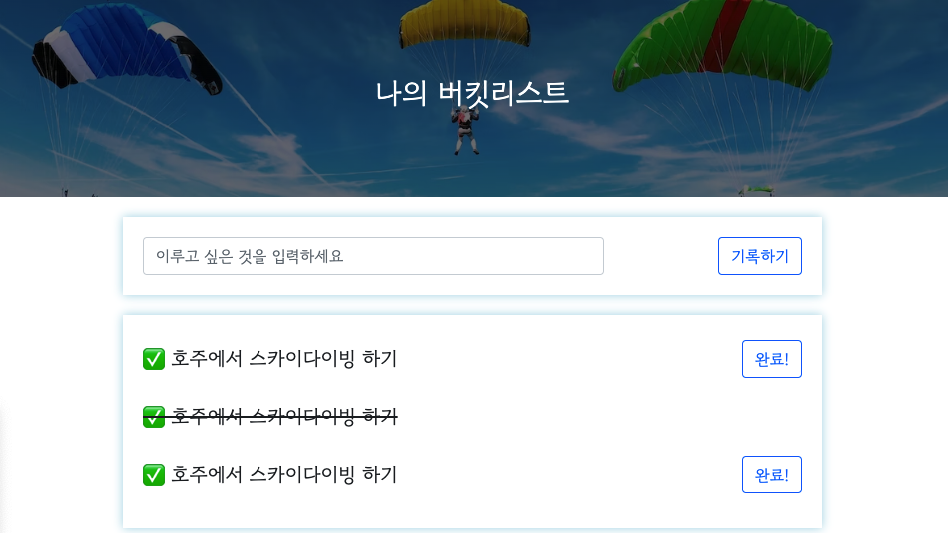
Project-Bucketlist
Desired outcome
http://spartacodingclub.shop/web/bucket
Before starting the project,
- New project- click bucketlist folder

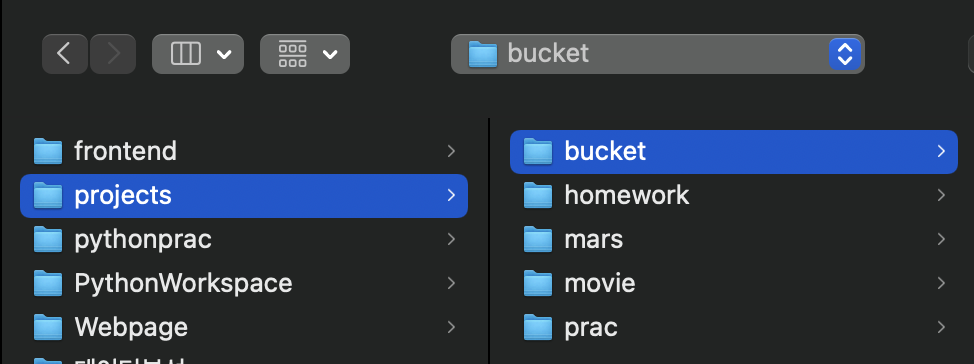
New directory for static, and templates, Python file named app.py, and index.html file(under
templatesfolder).Open
MongoDB Atlas
https://cloud.mongodb.com/
Basic structure
app.pycode snippets
from flask import Flask, render_template, request, jsonify
app = Flask(__name__)

@app.route('/')
def home():
   return render_template('index.html')

@app.route("/bucket", methods=["POST"])
def bucket_post():
    sample_receive = request.form['sample_give']
    print(sample_receive)
    return jsonify({'msg': 'POST(기록) 연결 완료!'})

@app.route("/bucket/done", methods=["POST"])
def bucket_done():
    sample_receive = request.form['sample_give']
    print(sample_receive)
    return jsonify({'msg': 'POST(완료) 연결 완료!'})

@app.route("/bucket", methods=["GET"])
def bucket_get():
    return jsonify({'msg': 'GET 연결 완료!'})

if __name__ == '__main__':
   app.run('0.0.0.0', port=5000, debug=True)
index.htmlcode snippets.
<!DOCTYPE html>
<html lang="en">
<head>
    <meta charset="UTF-8">
    <meta http-equiv="X-UA-Compatible" content="IE=edge">
    <meta name="viewport" content="width=device-width, initial-scale=1.0">

    <link href="https://cdn.jsdelivr.net/npm/bootstrap@5.0.2/dist/css/bootstrap.min.css" rel="stylesheet"
        integrity="sha384-EVSTQN3/azprG1Anm3QDgpJLIm9Nao0Yz1ztcQTwFspd3yD65VohhpuuCOmLASjC" crossorigin="anonymous">
    <script src="https://ajax.googleapis.com/ajax/libs/jquery/3.5.1/jquery.min.js"></script>
    <script src="https://cdn.jsdelivr.net/npm/bootstrap@5.0.2/dist/js/bootstrap.bundle.min.js"
        integrity="sha384-MrcW6ZMFYlzcLA8Nl+NtUVF0sA7MsXsP1UyJoMp4YLEuNSfAP+JcXn/tWtIaxVXM"
        crossorigin="anonymous"></script>

    <link href="https://fonts.googleapis.com/css2?family=Gowun+Dodum&display=swap" rel="stylesheet">

    <title>인생 버킷리스트</title>

    <style>
        * {
            font-family: 'Gowun Dodum', sans-serif;
        }
        .mypic {
            width: 100%;
            height: 200px;

            background-image: linear-gradient(0deg, rgba(0, 0, 0, 0.5), rgba(0, 0, 0, 0.5)), url('https://images.unsplash.com/photo-1601024445121-e5b82f020549?ixid=MnwxMjA3fDB8MHxwaG90by1wYWdlfHx8fGVufDB8fHx8&ixlib=rb-1.2.1&auto=format&fit=crop&w=1189&q=80');
            background-position: center;
            background-size: cover;

            color: white;

            display: flex;
            flex-direction: column;
            align-items: center;
            justify-content: center;
        }
        .mypic > h1 {
            font-size: 30px;
        }
        .mybox {
            width: 95%;
            max-width: 700px;
            padding: 20px;
            box-shadow: 0px 0px 10px 0px lightblue;
            margin: 20px auto;
        }
        .mybucket {
            display: flex;
            flex-direction: row;
            align-items: center;
            justify-content: space-between;
        }

        .mybucket > input {
            width: 70%;
        }
        .mybox > li {
            display: flex;
            flex-direction: row;
            align-items: center;
            justify-content: center;

            margin-bottom: 10px;
            min-height: 48px;
        }
        .mybox > li > h2 {
            max-width: 75%;
            font-size: 20px;
            font-weight: 500;
            margin-right: auto;
            margin-bottom: 0px;
        }
        .mybox > li > h2.done {
            text-decoration:line-through
        }
    </style>
    <script>
        $(document).ready(function () {
            show_bucket();
        });
        function show_bucket(){
            $.ajax({
                type: "GET",
                url: "/bucket",
                data: {},
                success: function (response) {
                    alert(response["msg"])
                }
            });
        }
        function save_bucket(){
            $.ajax({
                type: "POST",
                url: "/bucket",
                data: {sample_give:'데이터전송'},
                success: function (response) {
                    alert(response["msg"])
                }
            });
        }
        function done_bucket(num){
            $.ajax({
                type: "POST",
                url: "/bucket/done",
                data: {sample_give:'데이터전송'},
                success: function (response) {
                    alert(response["msg"])
                }
            });
        }
    </script>
</head>
<body>
    <div class="mypic">
        <h1>나의 버킷리스트</h1>
    </div>
    <div class="mybox">
        <div class="mybucket">
            <input id="bucket" class="form-control" type="text" placeholder="이루고 싶은 것을 입력하세요">
            <button onclick="save_bucket()" type="button" class="btn btn-outline-primary">기록하기</button>
        </div>
    </div>
    <div class="mybox" id="bucket-list">
        <li>
            <h2>✅ 호주에서 스카이다이빙 하기</h2>
            <button onclick="done_bucket(5)" type="button" class="btn btn-outline-primary">완료!</button>
        </li>
        <li>
            <h2 class="done">✅ 호주에서 스카이다이빙 하기</h2>
        </li>
        <li>
            <h2>✅ 호주에서 스카이다이빙 하기</h2>
            <button type="button" class="btn btn-outline-primary">완료!</button>
        </li>
    </div>
</body>
</html>
copy the codes above and paste them respectively.
Run
app.pyto see if it works and openlocalhost:5000
POST (Input)
1. Request :  URL= /bucket, Type of request = POST
2. Client(ajax) → Server(flask) : bucket
3. Server(flask) → Client(ajax) : Send a message (기록 완료!)

Plus, the server needs to do one more thing which is creating a number and storing a list with the number in order to update the list!
- Let's change
sample_givetobucket_giveandsample_receivetobucket_receive.
@app.route("/bucket", methods=["POST"])
def bucket_done():
    sample_receive = request.form['sample_give']
    print(sample_receive)
    return jsonify({'msg': 'POST(기록) 연결 완료!'})
to
@app.route("/bucket", methods=["POST"])
def bucket_post():
    bucket_receive = request.form['bucket_give']
    print(sample_receive)
    return jsonify({'msg': 'POST(기록) 연결 완료!'})
- delete
print(sample_receive)
@app.route("/bucket", methods=["POST"])
def bucket_post():
    bucket_receive = request.form['bucket_give']

    return jsonify({'msg': 'POST(기록) 연결 완료!'})
- To connect the data to DB, add
pymongobasic code.
from pymongo import MongoClient
client = MongoClient('mongodb+srv://test:sparta@cluster0.grgzlle.mongodb.net/?retryWrites=true&w=majority')
db = client.dbsparta
- To save data into the DB, we need to use the code below.
doc = {
}

db.users.insert_one(doc)
    doc = {
        'num':0,
        'bucket':bucket_receive,
        'done':0
    }

    db.bucket.insert_one(doc)
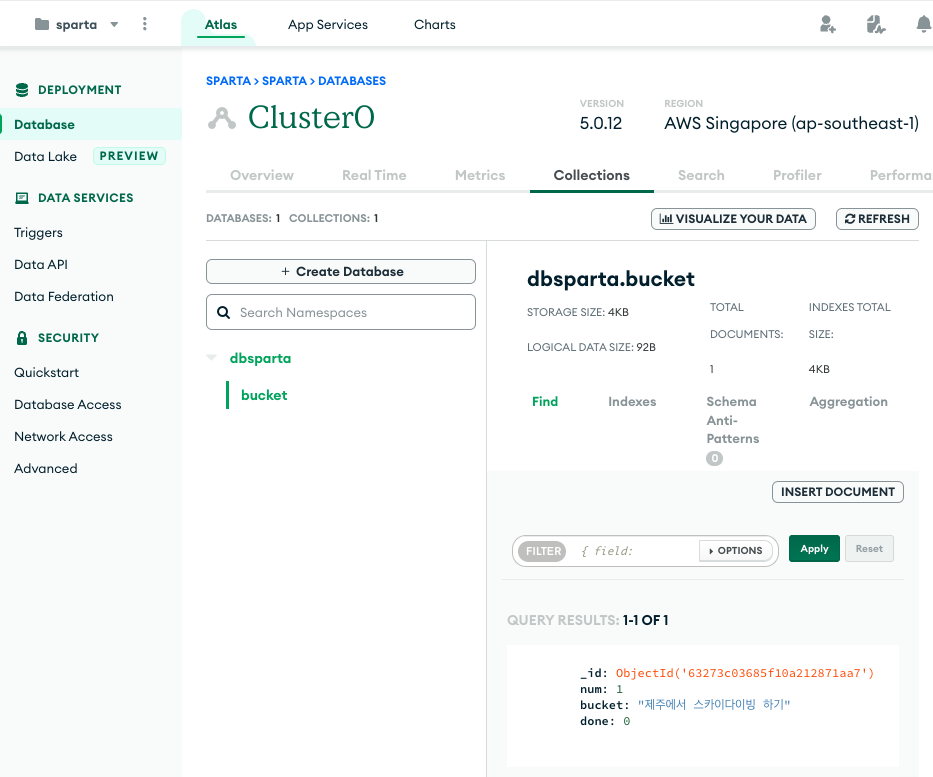
Let's try the tentative code 'num':0. 'done':0 means that it's 0 if it's been done and it's 1 if it's done.
- Change the message.
return jsonify({'msg': '등록 완료!'})
@app.route("/bucket", methods=["POST"])
def bucket_post():
    bucket_receive = request.form['bucket_give']

    doc = {
        'num':0,
        'bucket':bucket_receive,
        'done':0
    }

    db.bucket.insert_one(doc)

    return jsonify({'msg': '등록 완료!'})
- Let's update
doc = {'num':0}part. If there are already 2 items on the list, then the new item is 3rd one. Which means any new item's number comes after the existing items.
To see how many existing items we have, we need to have the list first. For this, we need to use,
# find multiple items. e.g (show me items excluding '_id' value)
all_users = list(db.users.find({},{'_id':False}))
paste it above doc ={}
bucket_list = list(db.bucket.find({}, {'_id': False}))
- Now, to count how many items on the list we need to use
len().
    bucket_list = list(db.bucket.find({}, {'_id': False}))
    count = len(bucket_list) + 1
- Update
'num':0to'num':count
@app.route("/bucket", methods=["POST"])
def bucket_post():
    bucket_receive = request.form['bucket_give']

    bucket_list = list(db.bucket.find({}, {'_id': False}))
    count = len(bucket_list) + 1

    doc = {
        'num':count,
        'bucket':bucket_receive,
        'done':0
    }

    db.bucket.insert_one(doc)

    return jsonify({'msg': '등록 완료!'})
- Let's make the Client part. Add
let bucket = $('#bucket').val()
        function save_bucket(){
            $.ajax({
                type: "POST",
                url: "/bucket",
                data: {sample_give:'데이터전송'},
                success: function (response) {
                    alert(response["msg"])
                }
            });
        }
to
        function save_bucket(){
            let bucket = $('#bucket').val()

            $.ajax({
                type: "POST",
                url: "/bucket",
                data: {sample_give:'데이터전송'},
                success: function (response) {
                    alert(response["msg"])
                }
            });
        }
- Change
sample_give:'데이터전송'tobucket_give
        function save_bucket(){
            let bucket = $('#bucket').val()

            $.ajax({
                type: "POST",
                url: "/bucket",
                data: {bucket_give:bucket},
                success: function (response) {
                    alert(response["msg"])
                }
            });
        }
- Add
window.location.reload()to make the webpage reload.
        function save_bucket(){
            let bucket = $('#bucket').val()

            $.ajax({
                type: "POST",
                url: "/bucket",
                data: {bucket_give:bucket},
                success: function (response) {
                    alert(response["msg"])
                    window.location.reload()
                }
            });
        }
- test if it works well.
Get
1. Request :  URL= /bucket, Type of request = GET
2. Client(ajax) → Server(flask) :  None
3. Server(flask) → Client(ajax) : Show all  bucket lists.
- To show all lists we have, add the code below to
bucket_get().
# 여러개 찾기 - 예시 ( _id 값은 제외하고 출력)
all_users = list(db.users.find({},{'_id':False}))
@app.route("/bucket", methods=["GET"])
def bucket_get():
    return jsonify({'msg': 'GET 연결 완료!'})
to
@app.route("/bucket", methods=["GET"])
def bucket_get():
    all_users = list(db.users.find({},{'_id':False}))

    return jsonify({'msg': 'GET 연결 완료!'})
to
@app.route("/bucket", methods=["GET"])
def bucket_get():
    bucket_list = list(db.bucket.find({}, {'_id': False}))

    return jsonify({'msg': 'GET 연결 완료!'})
- update
return
@app.route("/bucket", methods=["GET"])
def bucket_get():
    bucket_list = list(db.bucket.find({}, {'_id': False}))

    return jsonify({'buckets': bucket_list})
- Now, let's update client(
index.html) part to test it on Console.
    <script>
        $(document).ready(function () {
            show_bucket();
        });
        function show_bucket(){
            $.ajax({
                type: "GET",
                url: "/bucket",
                data: {},
                success: function (response) {
                    alert(response["msg"])
                }
            });
        }
to
    <script>
        $(document).ready(function () {
            show_bucket();
        });
        function show_bucket(){
            $.ajax({
                type: "GET",
                url: "/bucket",
                data: {},
                success: function (response) {
                    console.log(response['buckets'])
                }
            });
        }
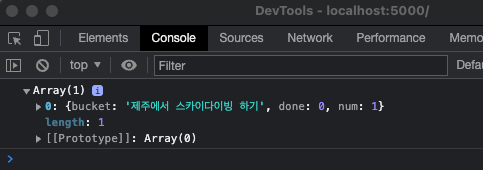
- Let's add one more list.
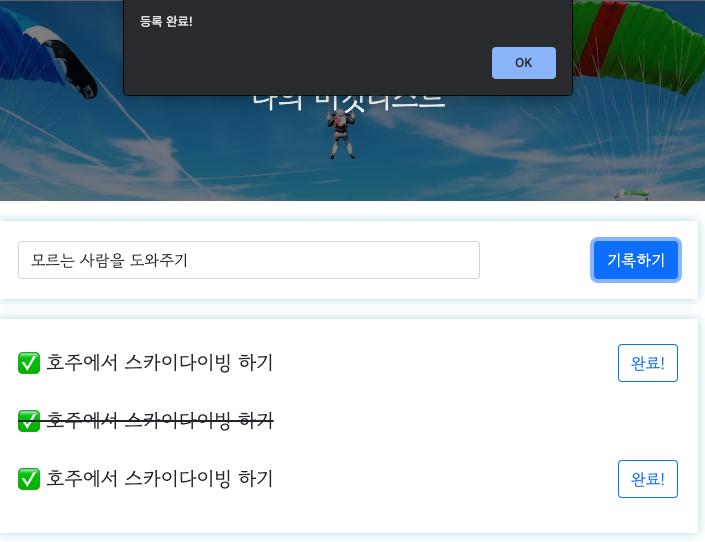
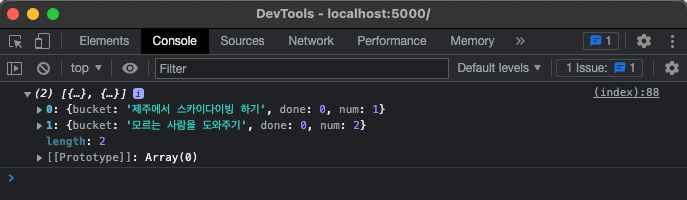
- Now, we want to make a new list added to the existing list instead of showing in Console.
delete console.log(response['buckets']) and add let and for
        function show_bucket(){
            $.ajax({
                type: "GET",
                url: "/bucket",
                data: {},
                success: function (response) {
                    let rows = response['buckets']
                    for (let i = 0; i < rows.length; i++) {

                    }
                }
            });
        }
to
        function show_bucket(){
            $.ajax({
                type: "GET",
                url: "/bucket",
                data: {},
                success: function (response) {
                    let rows = response['buckets']
                    for (let i = 0; i < rows.length; i++) {
                        let bucket = rows[i]['bucket']
                        let num = rows[i]['num']
                        let done = rows[i]['done']

                    }
                }
            });
        }
- Let's see which part this new list should be added.
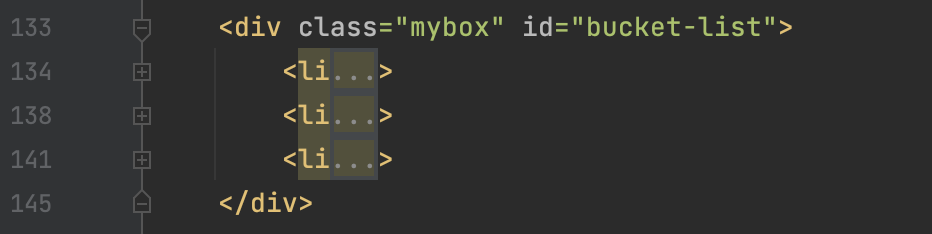
It should be added under the id named "bucket-list"
        function show_bucket(){
            $.ajax({
                type: "GET",
                url: "/bucket",
                data: {},
                success: function (response) {
                    let rows = response['buckets']
                    for (let i = 0; i < rows.length; i++) {
                        let bucket = rows[i]['bucket']
                        let num = rows[i]['num']
                        let done = rows[i]['done']

                        let temp_hitml = ``
                        if (done == 0) {
                            temp_html = `<li>
                                            <h2>✅ ${bucket}</h2>
                                            <button onclick="done_bucket(${num})" type="button" class="btn btn-outline-primary">완료!</button>
                                        </li>`
                        } else {
                            temp_html = `<li>
                                            <h2 class="done">✅ ${bucket}</h2>
                                        </li>`
                        }
                    }
                }
            });
        }
- To make it added to bucket-list,
        function show_bucket(){
            $.ajax({
                type: "GET",
                url: "/bucket",
                data: {},
                success: function (response) {
                    let rows = response['buckets']
                    for (let i = 0; i < rows.length; i++) {
                        let bucket = rows[i]['bucket']
                        let num = rows[i]['num']
                        let done = rows[i]['done']

                        let temp_hitml = ``
                        if (done == 0) {
                            temp_html = `<li>
                                            <h2>✅ ${bucket}</h2>
                                            <button onclick="done_bucket(${num})" type="button" class="btn btn-outline-primary">완료!</button>
                                        </li>`
                        } else {
                            temp_html = `<li>
                                            <h2 class="done">✅ ${bucket}</h2>
                                        </li>`
                        }
                        $('#bucket-list').append(temp_html)
                    }
                }
            });
        }
- delete the existing lists.


- if you refresh the page, we can see the below.
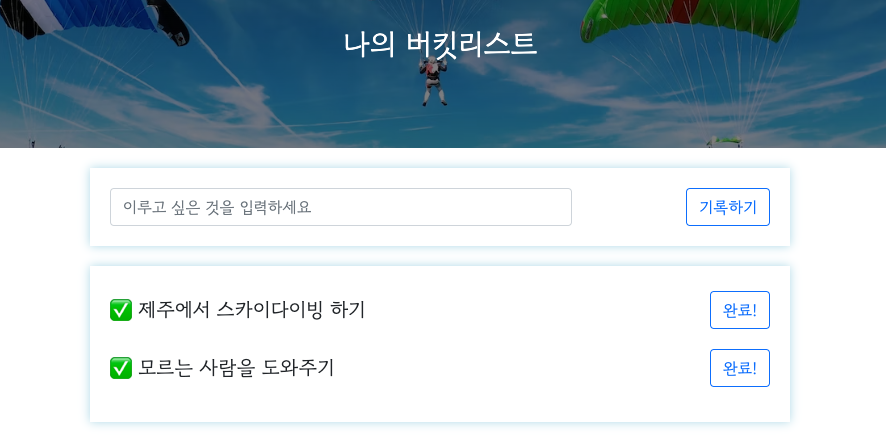
Post (Completed lists)
- Request info. : URL= /bucket/done, Type of the request = POST
- Client(ajax) → Server(flask) : num (Number)
Server(flask) → Client(ajax) : Send the message (버킷 완료!)
update
bucket_done()
@app.route("/bucket/done", methods=["POST"])
def bucket_done():
    sample_receive = request.form['sample_give']
    print(sample_receive)
    return jsonify({'msg': 'POST(완료) 연결 완료!'})
to
@app.route("/bucket/done", methods=["POST"])
def bucket_done():
    num_receive = request.form['num_give']
    db.bucket.update_one({'num': int(num_receive)}, {'$set': {'done': 1}})
    return jsonify({'msg': '버킷 완료!'})
- Let's update Client part.
        function done_bucket(num){
            $.ajax({
                type: "POST",
                url: "/bucket/done",
                data: {sample_give:'데이터전송'},
                success: function (response) {
                    alert(response["msg"])
                }
            });
        }
to
        function done_bucket(num){
            $.ajax({
                type: "POST",
                url: "/bucket/done",
                data: {num_give:num},
                success: function (response) {
                    alert(response["msg"])
                }
            });
        }
- Make it refresh once it's updated.
        function done_bucket(num){
            $.ajax({
                type: "POST",
                url: "/bucket/done",
                data: {num_give:num},
                success: function (response) {
                    alert(response["msg"])
                    window.location.reload()
                }
            });
        }